
Why Arrow?
Overview
Introduction to Column-Oriented Data Storage
Deep Dive into Parquet
Working with Arrow in R
Querying Parquet with Different Engines
Arrow Datasets for Larger-than-Memory Operations
Partitioning Strategies
Hands-on Workshop: Analysis with PUMS Data
These slides borrowed from the JSM Big Data 2025 workshop
Introduction to Column-Oriented Data Storage
Data storage?
Data has to be represented somewhere, both during analysis and when storing.
The shape and characteristics of this representation impacts performance.
What if you could speed up a key part of your analysis by 30x and reduce your storage by 10x?
Row vs. Column-Oriented Storage
Row-oriented
|ID|Name |Age|City    |
|--|-----|---|--------|
|1 |Alice|25 |New York|
|2 |Bob  |30 |Boston  |
|3 |Carol|45 |Chicago |- Efficient for single record access
- Efficient for appending
Column-oriented
ID:    [1, 2, 3]
Name:  [Alice, Bob, Carol]
Age:   [25, 30, 45]
City: [New York, Boston, Chicago]- Efficient for analytics
- Better compression
Why Column-Oriented Storage?
- Analytics typically access a subset of columns
- “What is the average age by city?”
- Only needs [Age, City] columns
- Benefits:
- Only read needed columns from disk
- Similar data types stored together
- Better compression ratios
Column-Oriented Data is great
And you use column-oriented dataframes already!
… but still storing my data in a fundamentally row-oriented way.
The interconnection problem
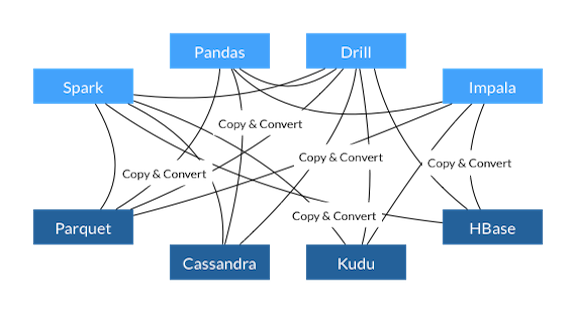
The interconnection problem
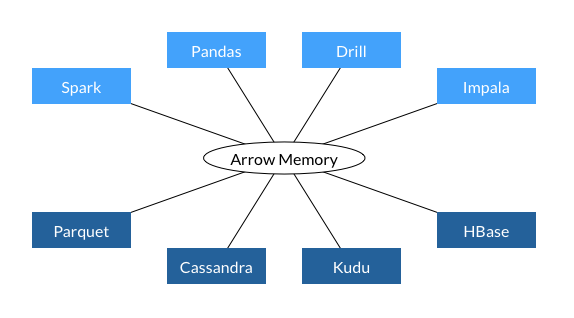
What is Apache Arrow?

- Cross-language development platform for in-memory data
- Consistent in-memory columnar data format
- Language-independent
- Zero-copy reads
- Benefits:
- Seamless data interchange between systems
- Fast analytical processing
- Efficient memory usage
What is Apache Parquet?

- Open-source columnar storage format
- Created by Twitter and Cloudera in 2013
- Part of the Apache Software Foundation
- Features:
- Columnar storage
- Efficient compression
- Explicit schema
- Statistical metadata
Get the Data
https://github.com/arrowrbook/book/releases/download/PUMS_subset/PUMS.subset.zip
Get the Data
Reading a File
As a CSV file
   user  system elapsed
  2.278   0.048   2.347
Reading a File
As a zipped CSV file
   user  system elapsed
  0.268   0.000   0.293
Reading a File
As a CSV file with arrow
   user  system elapsed
  0.931   0.277   0.196
Reading a File
As a Parquet file
  user  system elapsed
0.105 0.015 0.120 Deep Dive into Parquet
What is Parquet?
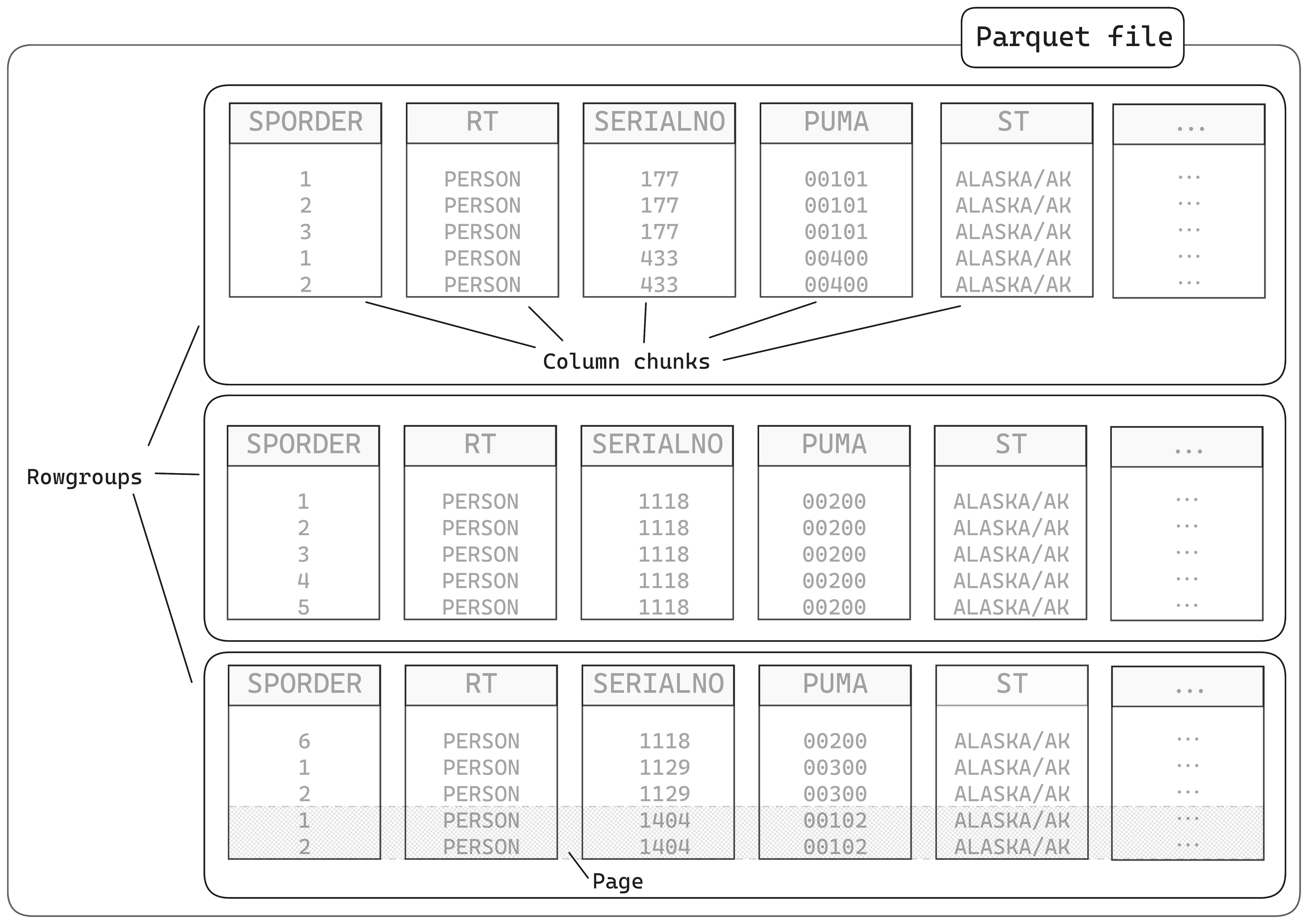
- Schema metadata
- Self-describing format
- Preserves column types
- Type-safe data interchange
- Encodings
- Dictionary — Particularly effective for categorical data
- Run-length encoding - Efficient storage of sequential repeated values
- Advanced compression
- Column-specific compression algorithms
- Both dictionary and value compression
Exercise
Are there any differences?
Exercise
Exercise
Inside a Parquet File
Benchmarks: Parquet vs CSV


Reading Efficiency: Selecting Columns
- With CSV:
- Must read entire file, even if you only need a few columns
- No efficient way to skip columns during read
- With Parquet:
- Read only needed columns from disk
- Significant performance benefit for wide tables
   user  system elapsed
  0.012   0.000   0.011
user system elapsed
0.301 0.053 0.084 Parquet Tooling Ecosystem
Languages with native Parquet support:
- R (via arrow)
- Python (via pyarrow, pandas)
- Java
- C++
- Rust
- JavaScript
- Go
Parquet Tooling Ecosystem
Systems with Parquet integration:
- Apache Spark
- Apache Hadoop
- Apache Drill
- Snowflake
- Amazon Athena
- Google BigQuery
- DuckDB
Working with Parquet files with Arrow in R
Introduction to the arrow Package
- The arrow package provides:
- Native R interface to Apache Arrow
- Tools for working with large datasets
- Integration with dplyr for data manipulation
- Reading/writing various file formats
Reading and Writing Parquet files, revisited
Demo: Using dplyr with arrow
Arrow Datasets for Larger-than-Memory Operations
Understanding Arrow Datasets vs. Tables
Arrow Table
- In-memory data structure
- Must fit in RAM
- Fast operations
- Similar to base data frames
- Good for single file data
Arrow Dataset
- Collection of files
- Lazily evaluated
- Larger-than-memory capable
- Distributed execution
- Supports partitioning
Demo: Opening and Querying Multi-file Datasets
Lazy Evaluation and Query Optimization
- Lazy evaluation workflow:
- Define operations (filter, group, summarize)
- Arrow builds an execution plan
- Optimizes the plan (predicate pushdown, etc.)
- Only reads necessary data from disk
- Executes when
collect()is called
- Benefits:
- Minimizes memory usage
- Reduces I/O operations
- Leverages Arrow’s native compute functions
Partitioning Strategies
What is Partitioning?
- Dividing data into logical segments
- Stored in separate files/directories
- Based on one or more column values
- Enables efficient filtering
- Benefits:
- Faster queries that filter on partition columns
- Improved parallel processing
- Easier management of large datasets

Hive vs. Non-Hive Partitioning
Hive Partitioning
Directory format:
column=valueExample:
person/
├── year=2018/
│   ├── state=NY/
│   │   └── data.parquet
│   └── state=CA/
│       └── data.parquet
├── year=2019/
│   ├── ...
Self-describing structure
Standard in big data ecosystem
Non-Hive Partitioning
Directory format:
valueExample:
person/
├── 2018/
│   ├── NY/
│   │   └── data.parquet
│   └── CA/
│       └── data.parquet
├── 2019/
│   ├── ...
Requires column naming
Less verbose directory names
Effective Partitioning Strategies
- Choose partition columns wisely:
- Low to medium number of objects
- Commonly used in filters
- Balanced data distribution
- Common partition dimensions:
- Time (year, month, day)
- Geography (country, state, region)
- Category (product type, department)
- Source (system, sensor)
Partitioning in Practice: Writing Datasets
Demo: repartitioning the whole dataset
Best Practices for Partition Design
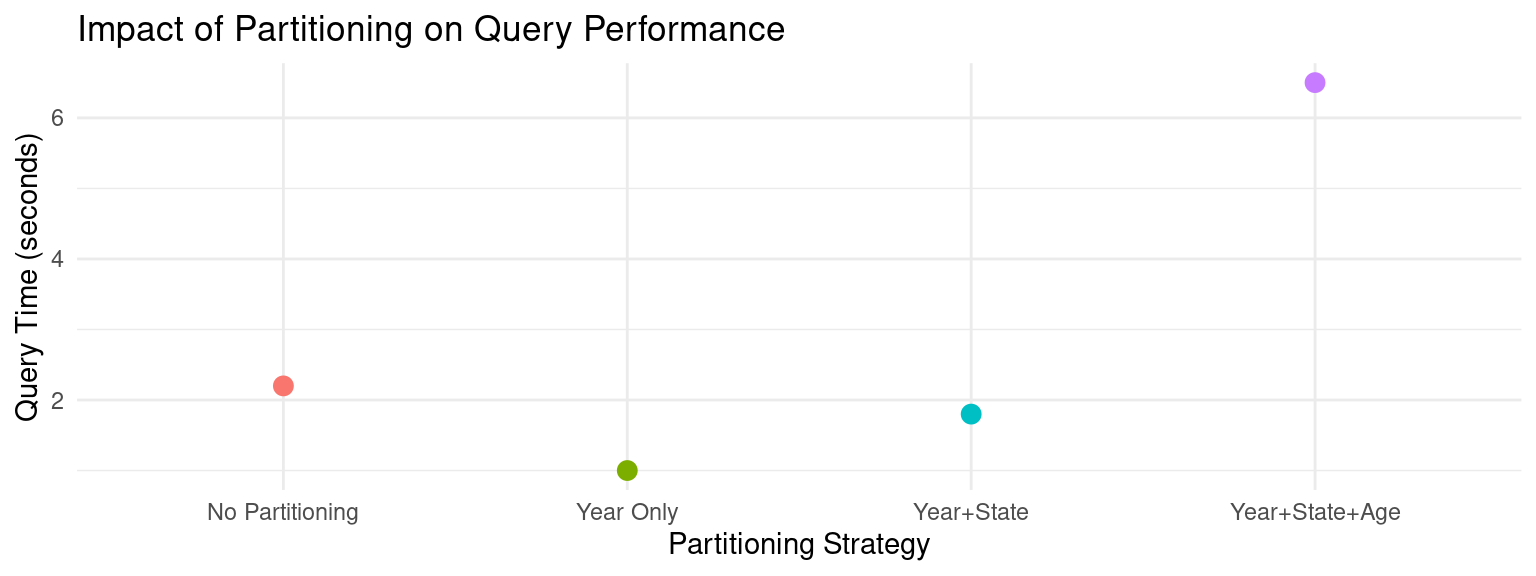
- Avoid over-partitioning:
- Too many small files = poor performance
- Target file size: 20MB–2GB
- Avoid high-cardinality columns (e.g., user_id)
- Consider query patterns:
- Partition by commonly filtered columns
- Balance between read speed and write complexity
- Nested partitioning considerations:
- Order from highest to lowest selectivity
- Limit partition depth (2-3 levels typically sufficient)
Partitioning Performance Impact
Conclusion
- Column-oriented storage formats like Parquet provide massive performance advantages for analytical workloads (30x speed, 10x smaller files)
- Apache Arrow enables seamless data interchange between systems without costly serialization/deserialization
- Partitioning strategies help manage large datasets effectively when working with data too big for memory
Conclusion
Resources:
- Arrow documentation: arrow.apache.org/docs/r
- Parquet: parquet.apache.org
- DuckDB: duckdb.org
- Book: Scaling up with Arrow and R